What changed on 16 November
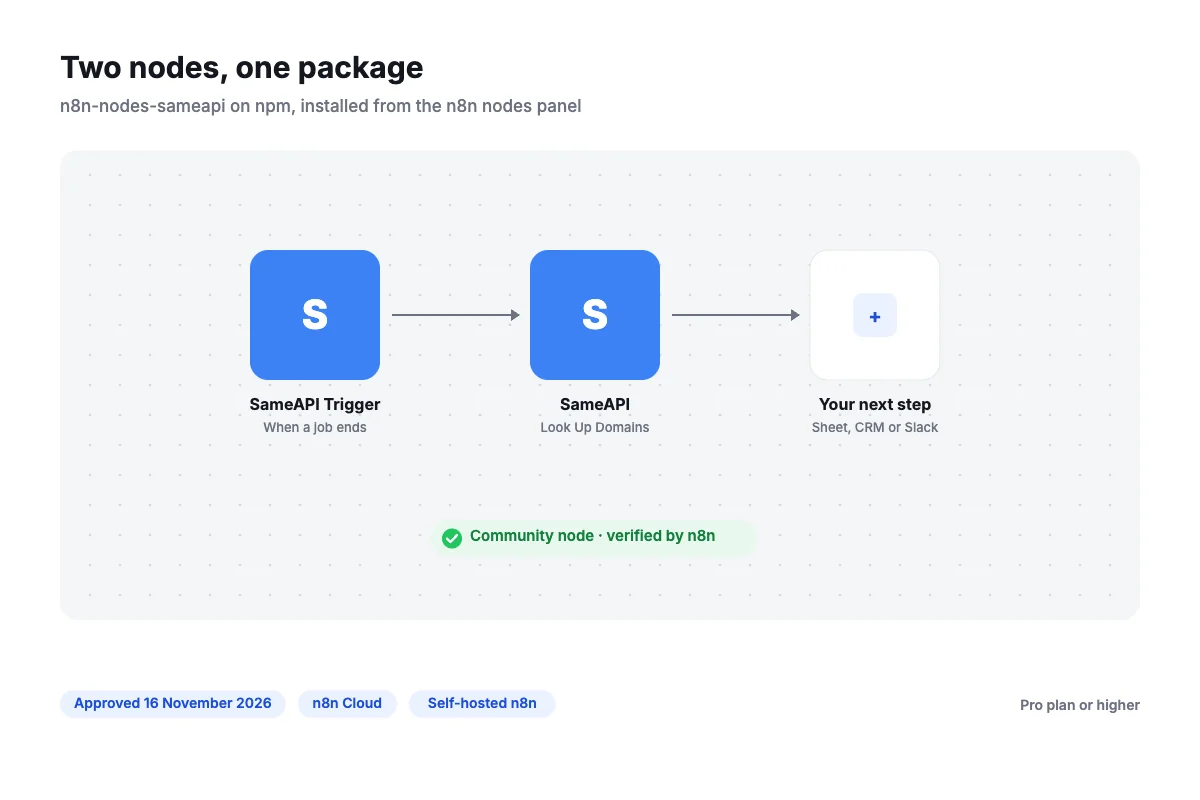
Before 16 November the SameAPI node was one more community package on npm. You could install it only on a self-hosted n8n, after a warning about unreviewed code.
Verification changes two things. The node shows up in the nodes panel and it now works on n8n Cloud too.
n8n checks a node before it lists it as verified. Their team reviewed our code and a demo video, then asked for changes before saying yes.
SameAPI wrote the node and keeps it up to date, while n8n reviewed it.
So it is a community node verified by n8n. It is not a node built by the n8n team.
Why a node, when the API already worked
SameAPI worked with n8n before the node existed. Our docs showed how to call the API from the HTTP Request node.
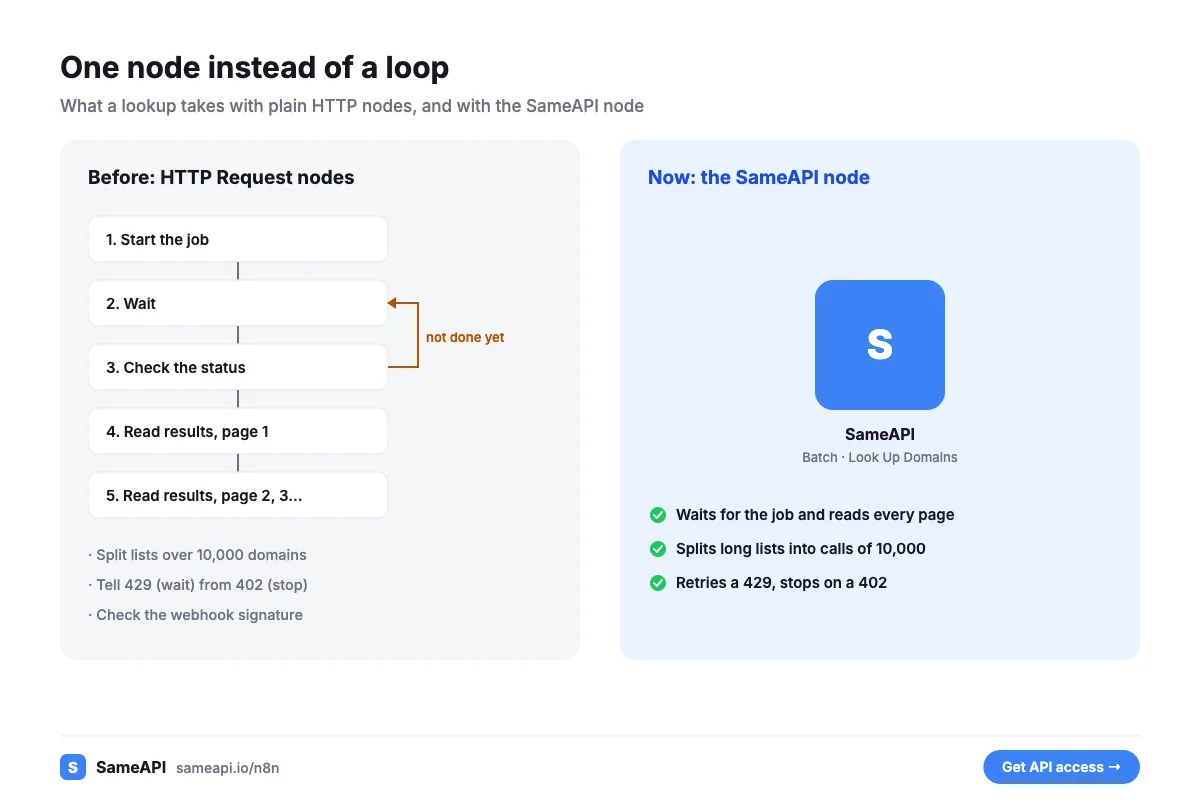
It worked, but the setup was long for anyone who does not write code. SameAPI does not answer a lookup in a single call.
You start a job, wait for it to finish, then read the results page by page. In plain HTTP nodes that becomes a loop of requests, waits and status checks.
A list of 20,000 domains adds one more step. One call to the Bulk Traffic API carries 10,000 domains at most, so the list has to be split first.
Then come the errors, which do not all mean the same thing. A rate limit answers 429 and asks you to wait a moment.
A plan with no requests left answers 402, where waiting will not help. A workflow that mixes them up retries forever.
Every builder had to work out these rules alone. We thought a node should hold them once, for everybody.
How we built it
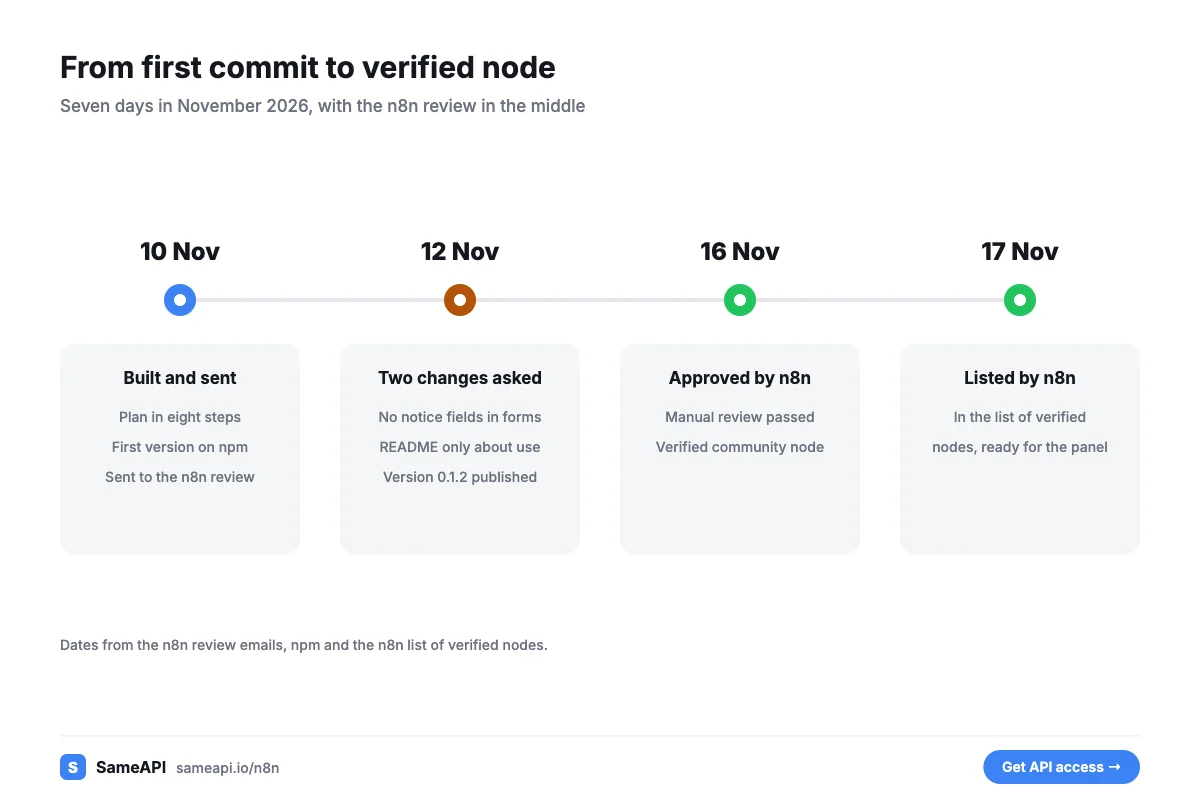
We started on 10 November 2026 with a plan in eight steps. Credentials came first, then single lookups, then lists, errors, tests and the trigger.
The code has three layers. One talks to the API, one cleans the response and one holds the logic of each operation.
If our response changes shape, we fix one layer and the workflows people built keep running.
The package has no runtime dependencies. n8n requires that for verified nodes, which also keeps the install small.
We wrote more than 100 automated tests. Then we ran every operation against the live API in a separate n8n instance.
Some errors only show up when you cause them on purpose. For a real 403 we used an account without API access.
For a real 429 we sent requests faster than the plan allows. The node waited as told and tried again.
One gap turned up in SameAPI itself, not in the node. Our webhook called you when a job finished, but stayed silent when a job failed.
A workflow waiting for that call would wait forever. So we added a job.failed event to SameAPI for the trigger to react to.
The first version reached npm that same evening. It is published from GitHub with provenance, so anyone can check which code built it.
What the n8n review asked us to change
We sent the node to n8n through their Creator Portal on 10 November. The automated checks passed in a few minutes.
The manual review came next and started with a short demo video. On 12 November the reviewer sent the node back with two requests.
First, our forms used notice fields to explain things inside the node. n8n does not allow them, so that text moved into the field descriptions and the README.
Second, our README talked about verification status. n8n wants a README that explains how to use the node and nothing more.
Version 0.1.2 went out that night with both fixes. n8n approved it on 16 November and added it to their list of verified nodes on 17 November.
The review was strict about small things, which we think is right. People install a node from the panel without reading its code.
What the node does
The package installs two nodes. SameAPI runs lookups and reads jobs, while SameAPI Trigger starts a workflow when a job ends.
The SameAPI node has five operations, grouped by resource:
- Domain, Get Traffic: looks up one domain and waits for the data
- Batch, Look Up Domains: looks up a list in one job and splits long lists for you
- Job, Get: shows the status and progress of a job
- Job, Get Results: reads the results of a job, all of them or up to a limit
- Account, Get Usage: shows your plan, monthly requests and rate limits
Each domain comes back as one item with ten top-level fields. Visits for three months, ranks, traffic sources, top countries, keywords and AI traffic are all there.
Shares arrive as percentages from 0 to 100, already converted. The node also works out the change against the previous month.
These are the numbers you see in the dashboard. The AI group is the same data our AI Traffic API returns.
A shortened real result for example.com, with data for October 2026:
{
  "domain": "example.com",
  "visits": {
    "latestMonth": "2026-10-01",
    "estimatedMonthlyVisits": 7991641,
    "changeVsPreviousMonthPercent": 3.38
  },
  "ranks": { "global": 9425, "country": { "code": "US", "rank": 13112 } },
  "trafficSources": { "direct": 52.03, "searchOrganic": 3.6, "referrals": 8.58, "genAi": 0.48 },
  "aiTraffic": { "totalVisits": 17329, "chatbots": [{ "name": "gemini.google.com", "sharePercent": 25.73 }] }
}
You can keep only what you need with Include Fields. A sheet with visits and global rank needs two groups, not ten.
A few choices stay invisible until something goes wrong:
- On a 429 the node waits as long as SameAPI says, then tries again up to five times
- It never repeats the creation of a job after a network error, so a retry cannot bill one lookup twice
- A domain looked up again within 5 minutes comes from cache and uses no request
- Errors are written in plain English; Continue on Fail puts them in the output instead of stopping the run
Install it and run a first lookup
You need a SameAPI Pro plan or higher, since the free plan has no API access. Pro costs $20 a month for 10,000 requests.
- In n8n, click + on the canvas and search for SameAPI. Open it under More from the community and click Install.
- Only the owner or an admin of the instance can install it. Everyone else can use it after that.
- In the SameAPI dashboard, open API Keys and create a key. In n8n, add a SameAPI node and paste the key into a new credential.
- Set Resource to Domain and Operation to Get Traffic. Type a domain and run the step.
On a self-hosted n8n there is a second way in. Open Settings, then Community Nodes, click Install and type n8n-nodes-sameapi.
A first workflow worth keeping
A single lookup proves the key works. The workflow worth building reads a list, checks every domain and writes the numbers back.
Start from a Google Sheet with a column named domain. Add a Google Sheets node that reads the rows.
If you only need numbers in a sheet once, Website Traffic in Google Sheets shows the route without n8n. The workflow is for lists you check again and again.
Then add SameAPI with Resource set to Batch and Operation set to Look Up Domains. Set Domains From to Each Input Item and Domain to this expression:
{{ $json.domain }}Keep Result on Wait for Results. Each domain comes back as its own item, ready for the next step.
Last, a Google Sheets node updates each row. Map the columns you care about with expressions like these:
{{ $json.visits.estimatedMonthlyVisits }}
{{ $json.ranks.global }}
{{ $json.visits.changeVsPreviousMonthPercent }}
Put a Schedule Trigger in front and the sheet refreshes every month on its own. It becomes your own Monthly Traffic Checker that nobody has to remember to run.
For a long list you do not have to keep the workflow waiting. Set Result to Return Job Immediately and paste the SameAPI Trigger URL into Webhook URL.
The trigger needs an n8n with a public https address. An n8n on your laptop cannot receive the call, so keep Wait for Results there.
The setup guide covers both workflows step by step, with the If node that splits finished jobs from failed ones.
Open the n8n setup guide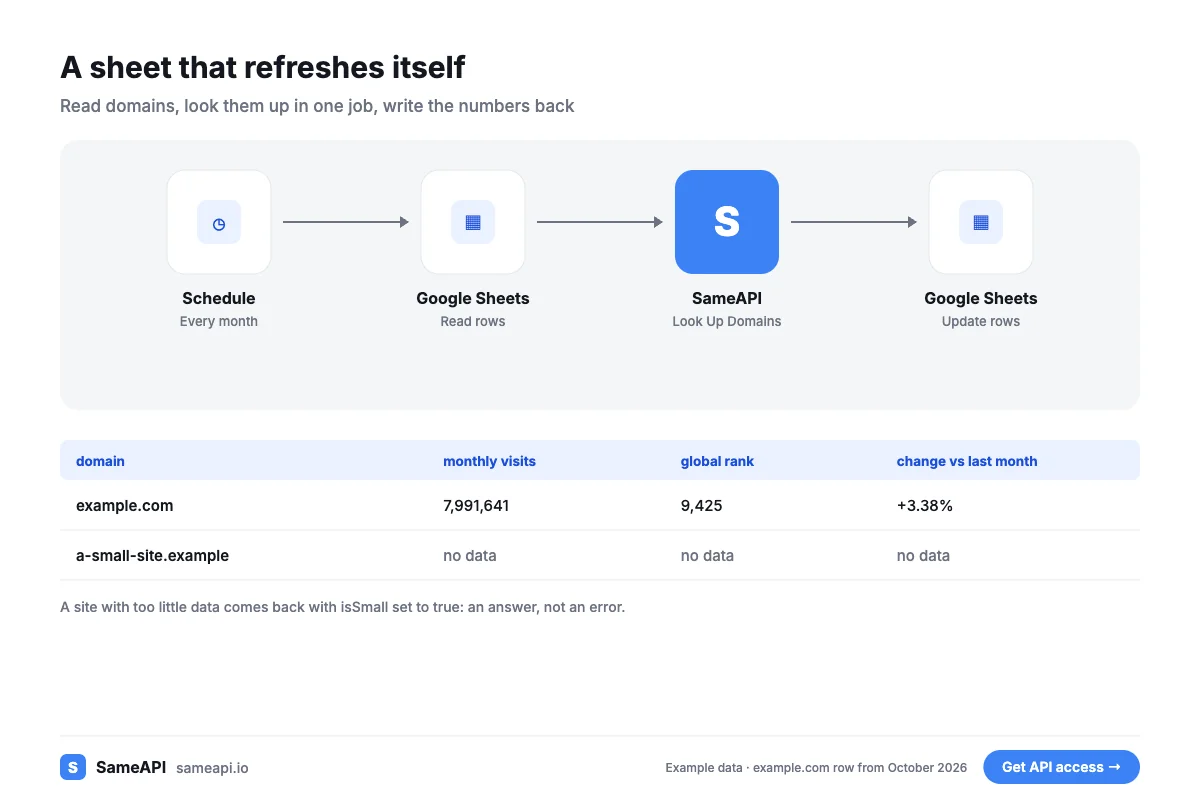
What the node will not do
It reads estimates, not your own analytics. The numbers are the ones SameAPI shows in the dashboard, with the same limits.
Small sites often have no data. The node says so with isSmall set to true, which is an answer and not an error.
It does not find domains for you. You bring the list from a sheet or a CRM, as in Add Website Traffic to HubSpot.
It needs an API plan. If you check a few domains a month, the free dashboard with 200 requests is enough.
When it reaches your n8n
n8n told us verified nodes reach every instance with their next release batch, within 14 days of approval. If the panel does not show SameAPI yet, check again after that.
On a self-hosted n8n you do not have to wait. The Settings route works today with the package name.
We will keep the node in step with the API. n8n reviews each new version we publish before it reaches the panel.